jambonz Supports OpenAI's GPT Live for Full-Duplex Voice Agents
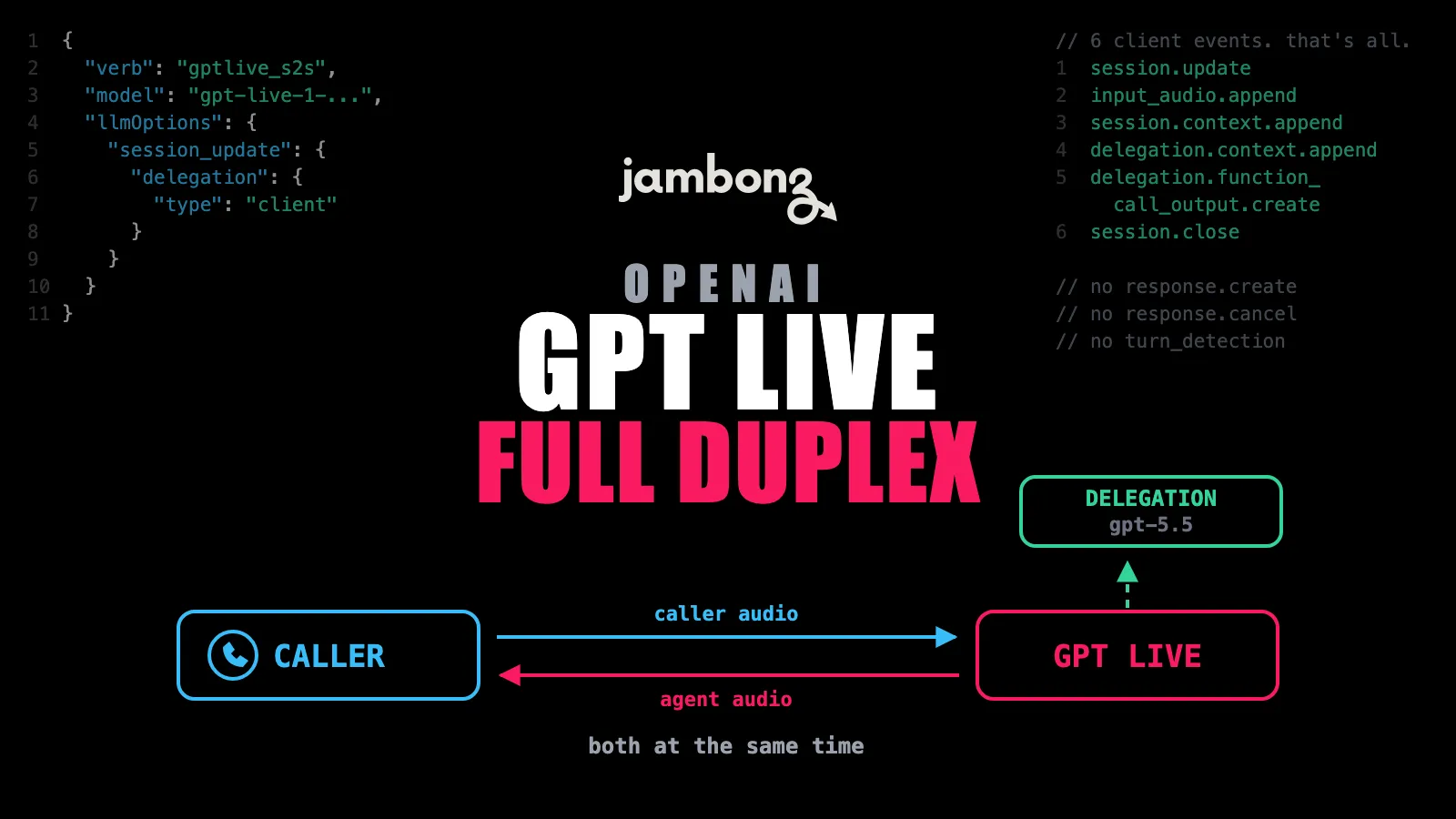
OpenAI’s GPT Live API is a different animal from the Realtime API that preceded it, and jambonz supports it as a first-class speech-to-speech vendor today.
Start from working code
If you’d rather read a running application than a blog post, go straight to our complete GPT Live example app in
jambonz/v10-examples. It’s a full TypeScript agent. Both delegation modes behind one environment variable, a realget_weathertool wired to Open-Meteo, and the greeting and event handling already sorted out. Clone it, drop in your API key, and point a jambonz application at it. The GPT Live tutorial walks through the same code line by line.
One practical note before you start: OpenAI is currently running GPT Live as a limited-access alpha, so you’ll need an API key enrolled in their Early Access Program. An unenrolled key connects and is then refused. That restriction is OpenAI’s, not ours. jambonz support is finished and shipping. Nothing changes on our side when access opens up. If you’re already in, you can point a phone number at GPT Live on jambonz.cloud and be talking to it in a few minutes.
How the GPT Live API Handles Full-Duplex Conversation
Every voice API most of us have built against, including OpenAI’s own Realtime API, is fundamentally a walkie-talkie: one side talks, the other listens, and something in the middle decides when to switch. GPT Live is full-duplex. It listens and speaks at the same time. In practice that means the model can drop a “mhmm” while you’re still talking, jump in with a quick clarification, or deliberately stay silent while you think, and it decides when to do all of that itself. For anything hard, it delegates in the background to a larger reasoning model while the conversation keeps flowing.
If you build phone agents for a living, that last point is the interesting one. The awkward silence after “let me look that up for you” is the single most common complaint about voice AI, and GPT Live’s answer is architectural rather than a prompt trick.
The flip side of the model driving the conversation is that a lot of the controls an
OpenAI Realtime developer reaches for simply aren’t there. There is no response.create to
solicit a turn, no response.cancel to interrupt one, and no turn_detection to tune. GPT
Live accepts exactly six client events, one of which is just audio. That’s a shift in how you write the application, which is
why we treated it as a separate vendor rather than a mode of the existing OpenAI
integration.
Connecting a Phone Call to the GPT Live API
Set vendor: 'gptlive' on the s2s verb and you’re most of the way there:
session.s2s({
  vendor: 'gptlive',
  // the model travels in the connection URL, so it goes here, not in session_update
  model: 'gpt-live-1-boulder-alpha', // check OpenAI's docs for the current model name
  auth: { apiKey: process.env.GPTLIVE_API_KEY },
  llmOptions: {
    session_update: {
      instructions: 'You are a friendly and helpful voice assistant. '
        + 'Keep your responses concise and conversational. '
        + 'You are speaking via voice, so respond in plain prose with no markdown.',
      audio: {
        output: { voice: 'marin' },
      },
      // 'client' asks your app for prose context; 'responses' enables function calling
      delegation: { type: 'client' },
    },
  },
  eventHook: '/s2s-event',
  actionHook: '/s2s-complete',
});
A few things worth knowing before you write that:
session_updateis required: GPT Live withholdssession.started(and therefore caller audio) until your startup configuration arrives. There is no “connect and start talking” path.- The agent speaking first takes a nudge: With no
response.create, the reliable pattern is asession.context.appendonsession.startedcarrying both the wording and the instruction to say it now. OpenAI treats that as guidance, not a playback command, so usesayif the exact greeting matters. - Don’t touch audio settings: The wire format is fixed at 24 kHz mono pcm16 and jambonz handles the transcoding.
- Tools live under
delegation: Function calling requiresdelegation.type: 'responses'withdelegation.responses.modelset, and the tools go atdelegation.responses.toolsusing the flat Responses function format. Tools at the top level (where the Realtime API puts them) are rejected at session start.
Delegations Are the New Concept
Everything else on this list is a renamed event or a missing knob. Delegation is the one idea that has no Realtime API equivalent. It’s worth understanding before you design your agent.
When the voice model decides it needs something it can’t produce on its own, it delegates. How it asks is your choice:
delegation.type: 'client': the model asks your application, in prose, for context
(“what is this caller’s account balance?”), and you answer in prose with a
delegation.context.append. No schemas, no JSON. Surprisingly pleasant for pulling in
CRM context.
delegation.type: 'responses': the delegated turn runs on OpenAI’s Responses API
against a model you name, typically gpt-5.5, and that turn can make real function calls
routed to your toolHook. You return results with
delegation.function_call_output.create, and there’s no follow-on response.create to
send — the server resumes the delegation itself.
Practically: if you need tools, MCP servers, or jambonz’s injected handoff and hangup
tools, you need responses. So it’s a two-model setup (a fast full-duplex voice model out
front and a reasoning model behind it) which is a fair description of what GPT Live is
doing under the hood anyway.
Coming from the OpenAI Realtime API
If you already run an OpenAI Realtime agent on jambonz, here’s the whole diff:
Realtime (openai) |
GPT Live (gptlive) |
|
|---|---|---|
| endpoint | /v1/realtime |
/v1/live |
| soliciting a turn | response_create |
(none — the model self-drives) |
| cancelling a turn | response.cancel |
(none — playout is flushed) |
| caller audio starts flowing after | first session.updated |
session.started |
| caller speech signal | input_audio_buffer.speech_started |
turn.created, role: "user" |
| turn detection | configurable | built in, not configurable |
| audio format | negotiable | fixed pcm16 mono 24 kHz |
| tools | session_update.tools |
session_update.delegation.responses.tools |
| tool results | conversation.item.create + response.create |
delegation.function_call_output.create |
| model name goes | in session_update |
on the verb |
Your verb, your hooks, and how your application is put together don’t change. What changes is that you stop orchestrating turns and let the model do it.
GPT Live Documentation and Resources
- The GPT Live tutorial walks through the whole setup, including both delegation modes, greetings, and tool calling.
- A complete working example lives in jambonz/v10-examples.
- The
llmverb reference documents every GPT Live option, event, and delegation field. - GPT Live support ships in jambonz v11.0.4 and later, and is live on jambonz.cloud now.
If your OpenAI key lacks access, the WebSocket handshake succeeds and the session is refused immediately afterward with
Voice session access denied. Because the connection comes up first, it reads like a jambonz
bug. It isn’t. It just means the key needs to be enrolled with OpenAI.
As always, come find us in the jambonz community with questions. We’d love to hear what you build with it.
Frequently asked questions
What is OpenAI GPT Live?
GPT Live is OpenAI's full-duplex voice model family, announced in July 2026 and built around listening and speaking at the same time rather than trading turns. It backchannels ('mhmm', 'yeah'), can stay quiet while the caller thinks, and hands hard questions off to a larger reasoning model in the background while the conversation keeps going. jambonz supports it as a native speech-to-speech vendor, so a phone call can talk to it directly.
Do I need special access from OpenAI to use GPT Live?
While OpenAI runs GPT Live as a limited-access alpha, yes: your OpenAI API key has to be enrolled in their Early Access Program. An unenrolled key completes the WebSocket handshake and is then refused at the application layer with 'Voice session access denied', which can look like a jambonz problem but isn't. jambonz support is finished and shipping either way, so nothing changes on our side when OpenAI opens access up.
Is GPT Live the same API as the OpenAI Realtime API?
No. Both are served from api.openai.com, but GPT Live is a different wire protocol on a different endpoint (/v1/live rather than /v1/realtime) with a different event vocabulary. GPT Live accepts exactly six client events: session.update, input_audio.append, session.context.append, delegation.context.append, delegation.function_call_output.create and session.close. There is no response.create, no response.cancel and no turn_detection configuration, and caller audio arrives on input_audio.append rather than the Realtime API's input_audio_buffer.append. In jambonz they are separate vendors ('gptlive' and 'openai') and separate verbs, gptlive_s2s and openai_s2s.
How do I migrate a jambonz OpenAI Realtime app to GPT Live?
Change vendor to 'gptlive', set model on the verb itself (not inside session_update — the model travels in the connection URL), drop response_create entirely, drop turn_detection and audio format settings, and move your tools from session_update.tools to session_update.delegation.responses.tools with delegation.type set to 'responses'. Your verb, your hooks, and how your application is put together are otherwise unchanged.
How does the agent speak first if there is no response.create?
GPT Live drives the conversation itself, so there is no client event that solicits a turn. Putting the greeting in instructions is not reliable. The working pattern is to send a session.context.append on the session.started event that tells the model both the wording and when to say it. Note that OpenAI treats a context append as guidance rather than a playback command (the model may paraphrase or stay silent) so if you need exact wording, play it with jambonz's own say or play verb instead.
What is a delegation?
Delegation is how GPT Live gets work done that the voice model can't do itself, and it is the piece with no analogue in the Realtime API. With delegation.type 'client' the model asks your application for free-form prose context, which you answer with a delegation.context.append. With delegation.type 'responses' the delegated turn runs on OpenAI's Responses API against a model you name (for example gpt-5.5) and can make real function calls, which you answer with delegation.function_call_output.create. Function calling, MCP servers, and jambonz's injected handoff and hangup tools all require the 'responses' flavor.
Does barge-in work?
Yes, and you don't configure it. GPT Live has no input_audio_buffer.speech_started event, so jambonz derives barge-in from turn.created events with role 'user', compares the turn's start against the agent's current audio burst on the shared server timeline, and flushes queued playout when the caller genuinely interrupts. There is no response.cancel to send — flushing the playout is the whole of it, because the model self-drives.
Do I need to configure audio formats or codecs?
No. GPT Live is fixed at 24 kHz mono pcm16 in both directions, and jambonz transcodes to and from whatever the call is actually using. Unlike the Realtime API, there is nothing to negotiate.
Which jambonz version do I need?
GPT Live support requires jambonz v11.0.4 or later with the mediajam media engine. jambonz.cloud is already running it, which is the fastest way to try GPT Live against a real phone call.