Situations: voice agents that change their instructions mid-call
A collections call turns into a hardship call the moment the caller says they've lost their job. Situations let your agent change its instructions when that happens.
Most voice agents get one prompt at the start of a call and keep it to the end. Real calls don’t work that way. A collections call becomes a hardship conversation when the caller says they’ve lost their job. A billing call becomes a dispute. Halfway through, the caller asks to be called back tomorrow.
The usual answer is to put all of it in one prompt: every branch, every exception, every “only after you’ve verified them”. That prompt gets longer with every case, the model follows less of it, and the rules that matter most, like not discussing an account before the caller is verified, end up as one more sentence that the model weighs against all the others.
Agent Studio now has a better answer, called Situations.
What a Situation is
A Situation is something that may come up on a call and change your priorities, or how you want the agent to respond to the caller. You describe it once, on the agent:
- When it applies: one line the model reads to decide, such as “The caller says they can’t afford the payment plans because of a job loss, illness or similar.”
- Instructions: what the agent should do while it is active.
- Tools: tools offered only while it is active, and tools hidden while it is.
- When it’s resolved: what the agent should stop doing once it ends.
While a Situation is active, its instructions are added to the agent’s prompt under their own heading, and its tools are offered. When it’s resolved, both go away again. A Situation can come up at any point in a call, alongside others (up to 3 at once), or not at all.
Two ways to start one
The important choice for each Situation is who can start it.
The agent decides. The model sees the Situation’s name and its one-line description, and starts it with a built-in
enter_situation tool when the conversation calls for it. This is for things the model can recognise from what the
caller says: hardship, a complaint, a callback request. It’s guidance: the model judges when it applies.
Only your server. The model never sees the Situation at all. One of your tools starts it, in its result. This is for anything that must be true before the agent may act, and that only your systems can tell: the caller is verified, the payment cleared, the account is eligible. It’s a guarantee: until your server says so, the agent has none of the Situation’s instructions and can’t call any of its tools, however the conversation goes.
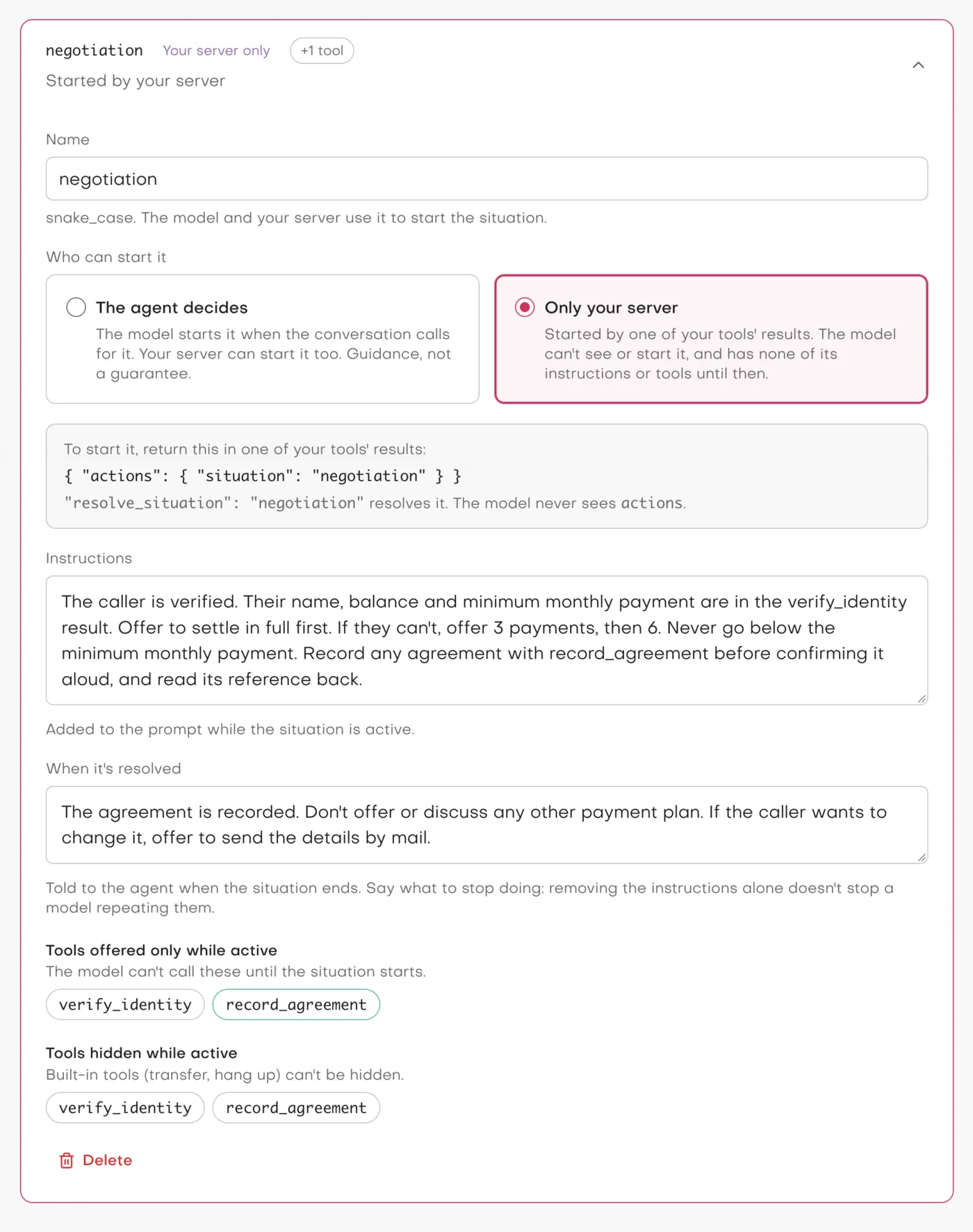
negotiation is set to Only your server. The builder shows the actions your tool returns to start it, and
record_agreement is offered only while it is active.
A collections call, step by step
Here is the example agent from the
Situations example repo. It has two tools on the
customer’s server, verify_identity and record_agreement, and three Situations:
| Situation | Who starts it | What it does |
|---|---|---|
negotiation |
only your server | the payment plan rules, and the record_agreement tool |
hardship |
the agent, but only once negotiation has started |
a gentler approach and the smallest plan |
callback_request |
the agent, at any time | arranges a callback |
The call starts. The agent’s prompt says it must verify the caller before discussing the account. It has
verify_identity, and it can start callback_request. It knows nothing about plans, and record_agreement isn’t in
its tool list.
The caller verifies. The agent calls verify_identity. The customer’s server checks the details and adds one
field to its result:
{
  "verified": true,
  "customer_name": "Jordan Lee",
  "balance": 1240.5,
  "actions": { "situation": "negotiation" }
}
Studio takes actions out of the result, starts negotiation, and updates the agent’s instructions and tools before
the model reads the result. The model gets the result without actions, and answers it already knowing the plan
rules, with record_agreement now available. Nothing about this needed a new endpoint or new credentials: the server
answers the tool call it was already answering, with one more field.
The caller says they lost their job. Now the model can start hardship. Until negotiation was active, it
couldn’t: hardship is set to start only once negotiation has started, so it wasn’t even offered. That matters,
because hardship offers a plan, and offering a plan to someone you haven’t verified is exactly what the collections
rules forbid.
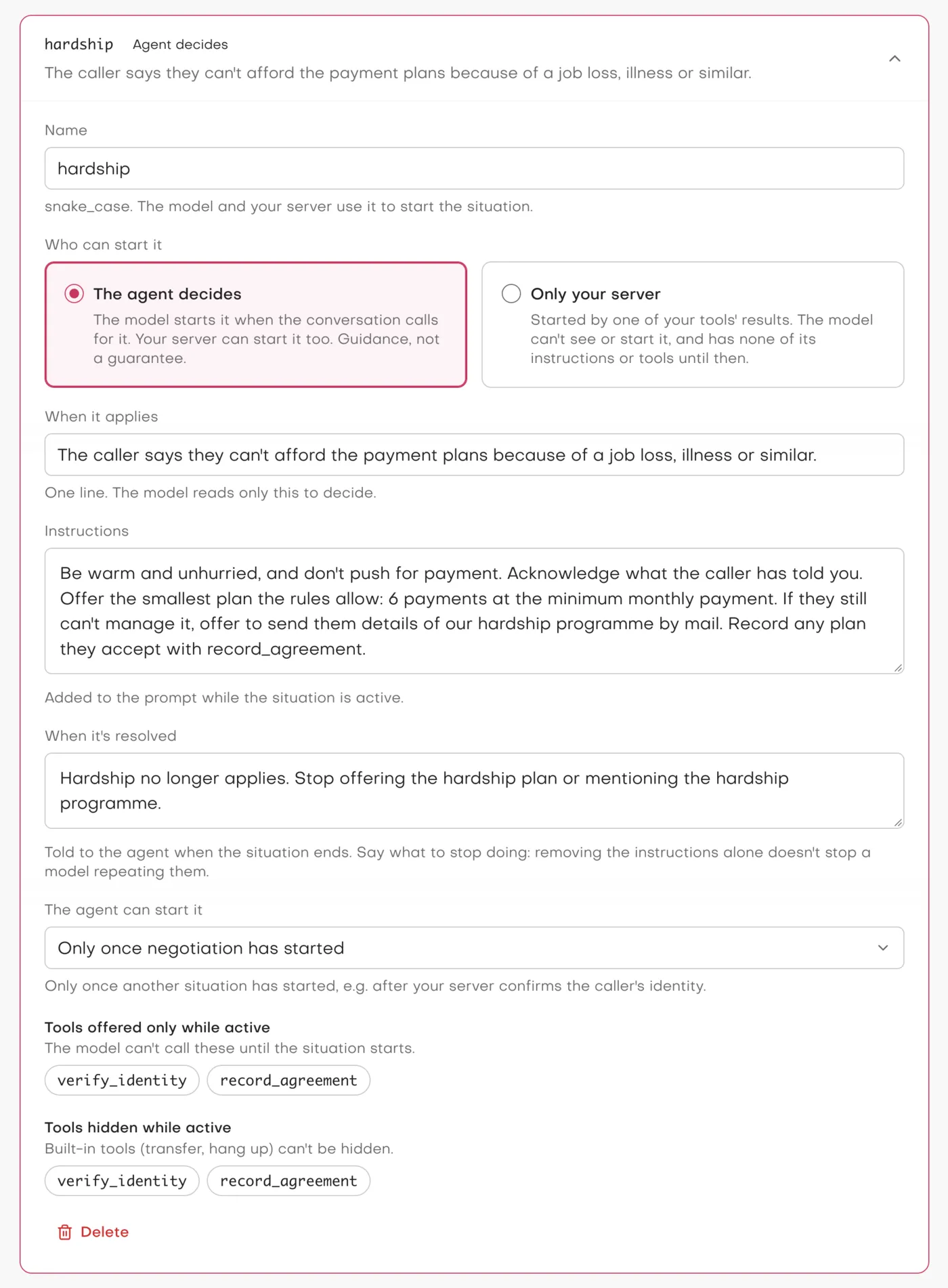
hardship is one the agent decides: the model reads When it applies, and can start it only once negotiation has
started.
The caller accepts a plan. The agent calls record_agreement. The server records it and resolves the Situation:
{ "recorded": true, "reference": "AGR-4471", "actions": { "resolve_situation": "negotiation" } }A resolve from a tool’s result waits for the agent’s reply. The result that ends a Situation usually finishes its work,
and the agent still needs the Situation’s instructions (“read the reference back”) to answer it. So the agent
confirms the plan and its reference aloud, and only then do the negotiation instructions go. hardship ends with it,
because it required negotiation.
Every one of those steps is on the call’s timeline: Started negotiation · by tool verify_identity, Started hardship · by the agent, Resolved negotiation · by tool record_agreement, and Resolved hardship · by tool record_agreement · negotiation ended. Each turn shows the Situations active through it.
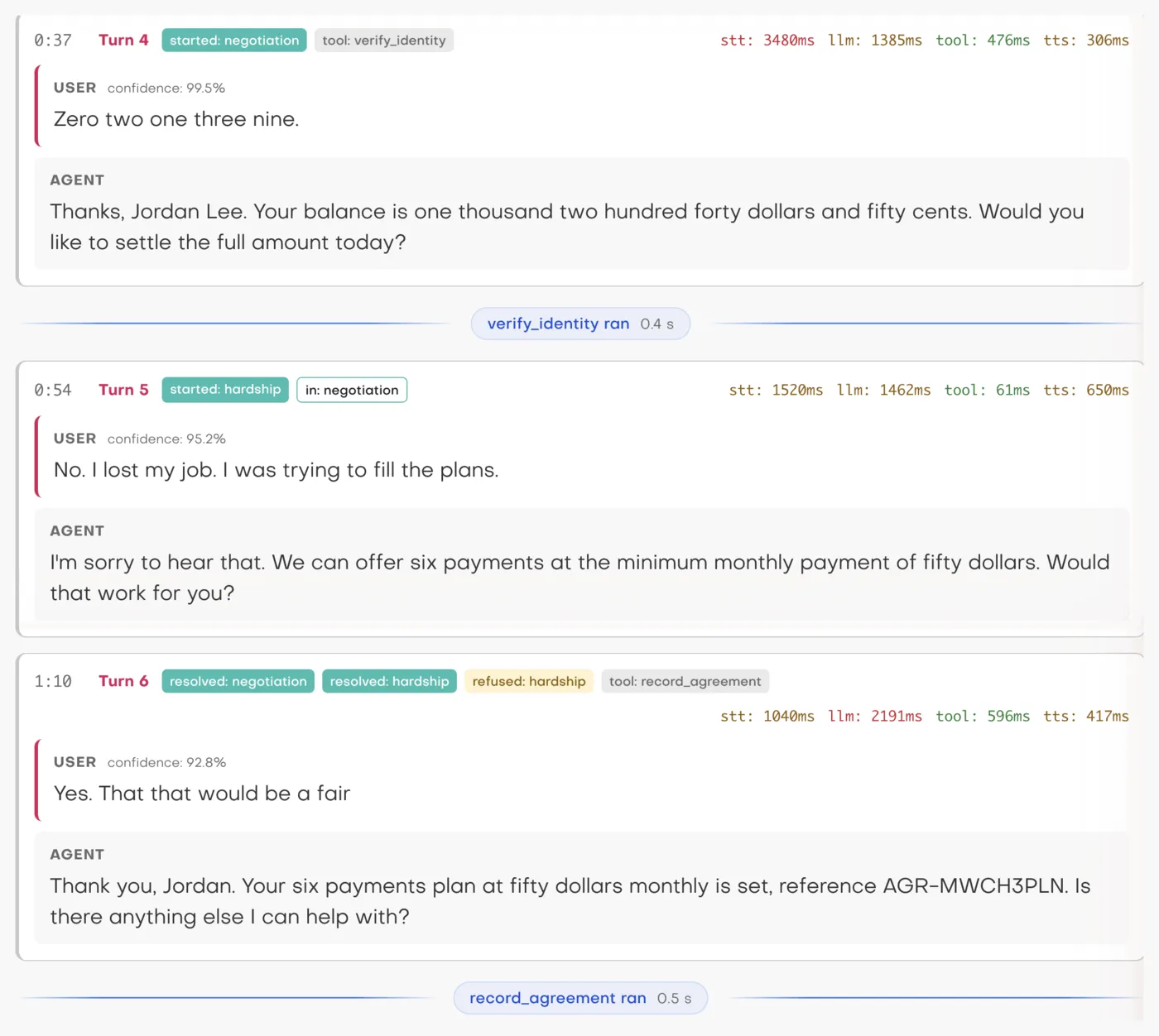 The test call in Calls. In turn 6 the model also tried to resolve
hardship itself, after the server had already ended
it; Studio refused, because it was no longer active.
Telling the model to stop
The obvious way to end a Situation is to remove its instructions. It doesn’t work. In our tests, a model that had been following a Situation’s instructions kept following them after they were removed from the prompt in 18 of 20 runs, on both gpt-4.1-mini and Claude Haiku 5.5. The conversation so far still shows it doing what it was doing, and the model carries on.
So a resolved Situation leaves a short block in the prompt with your When it’s resolved text:
## Resolved situation: hardship
hardship no longer applies. Stop offering the hardship plan or mentioning the hardship programme.
With that text, both models stopped in 20 of 20 runs. A generic “stop following its instructions” got only about half of them there, so the builder asks you to say what to stop.
The guarantee is enforced, not requested
A prompt that says “don’t call record_agreement until the caller is verified” is a request. Situations don’t rely on
the model honouring it. The tools a Situation adds aren’t in the model’s tool list until the Situation starts, and
Studio checks every tool call against the list that applies at that moment. If the model calls a tool it isn’t offered
right now, from an earlier turn or a hallucination, Studio refuses the call and tells the model the tool isn’t
available. A Situation that only your server can start can only be ended by your server, too.
Building one
Situations have their own section in the agent builder, between Conversation and Tools. The card at the top shows exactly what the model is told about the Situations it can start, so there is no guessing at a hidden prompt. Studio checks the configuration before you publish: a Situation that offers a tool the agent doesn’t have, hides a built-in tool like hang-up, or waits on a Situation that waits on it in turn won’t publish.
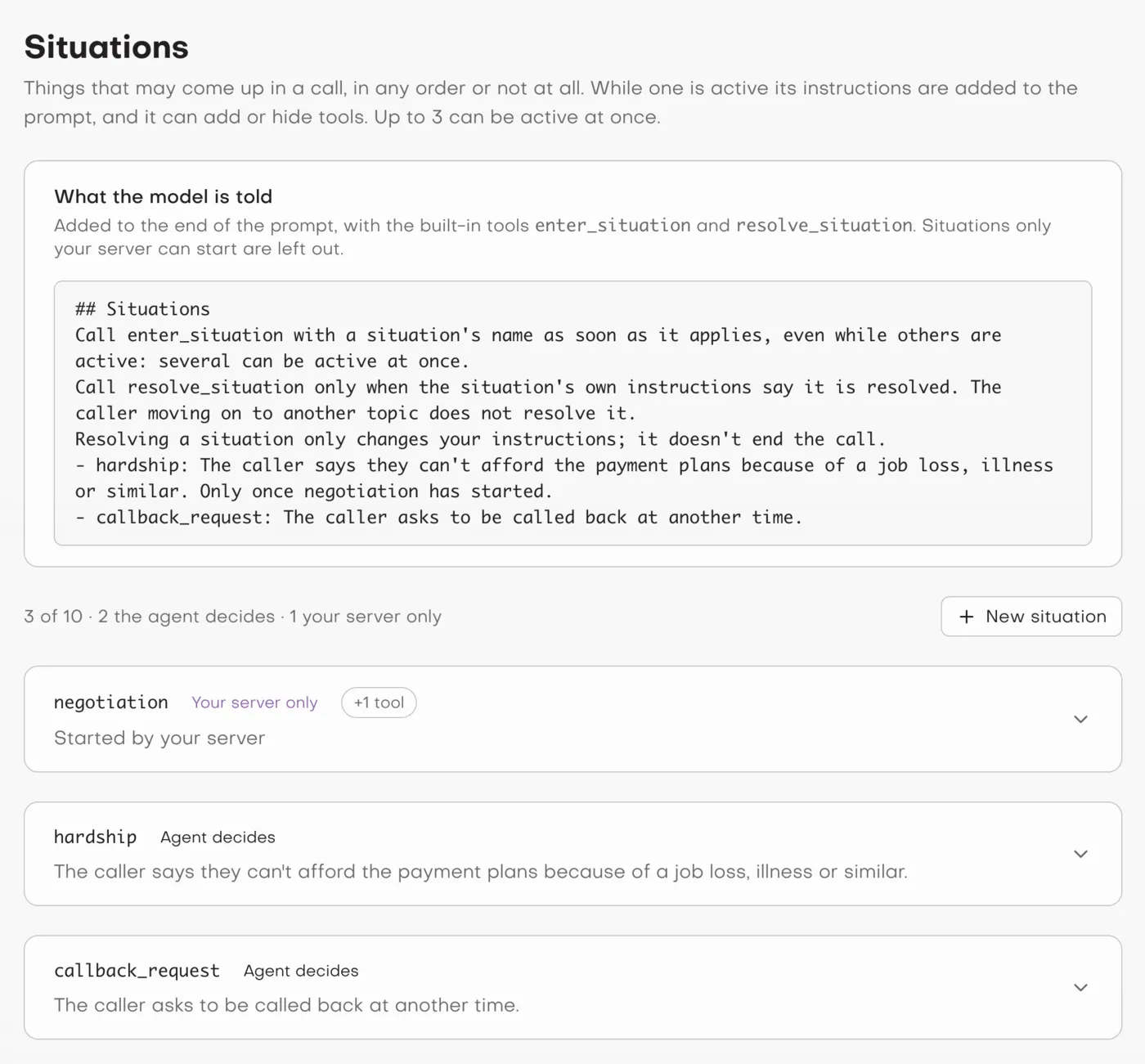 The Situations section.
negotiation is missing from what the model is told: only your server can start it.
On your server, starting a Situation is one field in a tool’s result. It works with any HTTP tool and with MCP tools. Studio signs every tool request, so your server can check that a request to start a Situation really came from your agent. Building a server for Studio shows how, with code for Node.js and Python.
Try it
- The example: jambonz/agent-studio-situations-example has the collections agent as a file you import into Studio, and the customer’s server it calls, with signature checks and tests.
- The docs: Situations, Starting Situations from your server and Building a server for Studio.
Situations work with cascaded voice pipeline agents today, on jambonz.cloud and on self-hosted jambonz 11.1.13 or later. Speech-to-speech agents are next: several speech-to-speech models can take new instructions and tools mid-session, and each needs its own testing before we turn it on.
Frequently asked questions
What is a Situation in Agent Studio?
A Situation is something that may come up during a call, such as a caller in financial hardship, a disputed charge or a request to be called back. You describe it once on the agent: when it applies, the instructions to follow while it is active, and tools to add or hide. During a call, when the Situation starts, its instructions are added to the agent's prompt and its tool changes apply. When it is resolved, they are removed again and the agent is told what to stop doing.
Who decides when a Situation starts?
Each Situation is set to one of two modes. With 'The agent decides', the model starts it when the conversation calls for it, using a one-line description of when it applies. With 'Only your server', the model never sees the Situation and cannot start it: one of your tools starts it by returning an actions object in its result. Your server can also start and resolve Situations the model decides.
How does my server start a Situation?
Any HTTP or MCP tool the agent calls can add an actions object to its JSON result, for example {"verified": true, "actions": {"situation": "negotiation"}} to start one, or {"actions": {"resolve_situation": "negotiation"}} to resolve it. Studio applies the change and removes actions from the result before the model sees it. No new endpoint or credentials are needed.
Can the model get around a Situation that only my server can start?
No. Until your server starts it, the model is never told the Situation exists, never gets its instructions, and cannot call the tools it adds. Studio enforces the tool list itself: a call to a tool that isn't offered at that moment is refused, whatever the model does.
How many Situations can an agent have?
Up to 10 per agent, and up to 3 active at once. When 3 are active, the model is refused if it tries to start another and told to resolve one first; a start from your server makes room by dropping the oldest Situation the model started.
Which agents can use Situations?
Cascaded voice pipeline agents, where jambonz runs speech-to-text, a language model and text-to-speech, on jambonz 11.1.13 or later. Speech-to-speech agents are planned. Connected agents (Dialogflow CES, ElevenLabs Agents) and custom harnesses can't use them: their instructions and tools live outside Studio.