Send Your Calls to Coval or Roark for Evaluation
If you build voice agents, you already know that shipping one is the easy part. Knowing whether it is doing a good job, call after call, is the hard part. That is the problem Coval and Roark solve: you send them your real calls, and they score them (transcripts, sentiment, custom LLM-judge metrics, whatever you have defined).
As of jambonz 11.1.4, sending those calls is a checkbox-level task. jambonz already records your calls and captures the turn-by-turn detail of each session through session observability. Now you can point that same data at one of these two platforms: choose the vendor, paste in your API key, and set the percentage of calls you want forwarded. No application code changes, bridge process to run, or webhooks to receive.
How to Send jambonz Calls to Coval or Roark
Everything lives in one place in the portal: Account Settings, in the Observability section.
- Pick your vendor from the Call evaluation vendor dropdown: Roark or Coval.
- Paste the API key you got from that vendor and click Test. jambonz makes a read-only call to their API and tells you right away whether the key is good, so you are not left waiting for the first call to find out. The key is stored encrypted, the same way your speech and storage credentials are.
- Set Percentage of calls to send. 100 sends every recorded call; drop it to 10 if you want a sample. The decision is deterministic per call, so a given call is either always sent or never sent. There is no partial conversations arriving at the vendor.
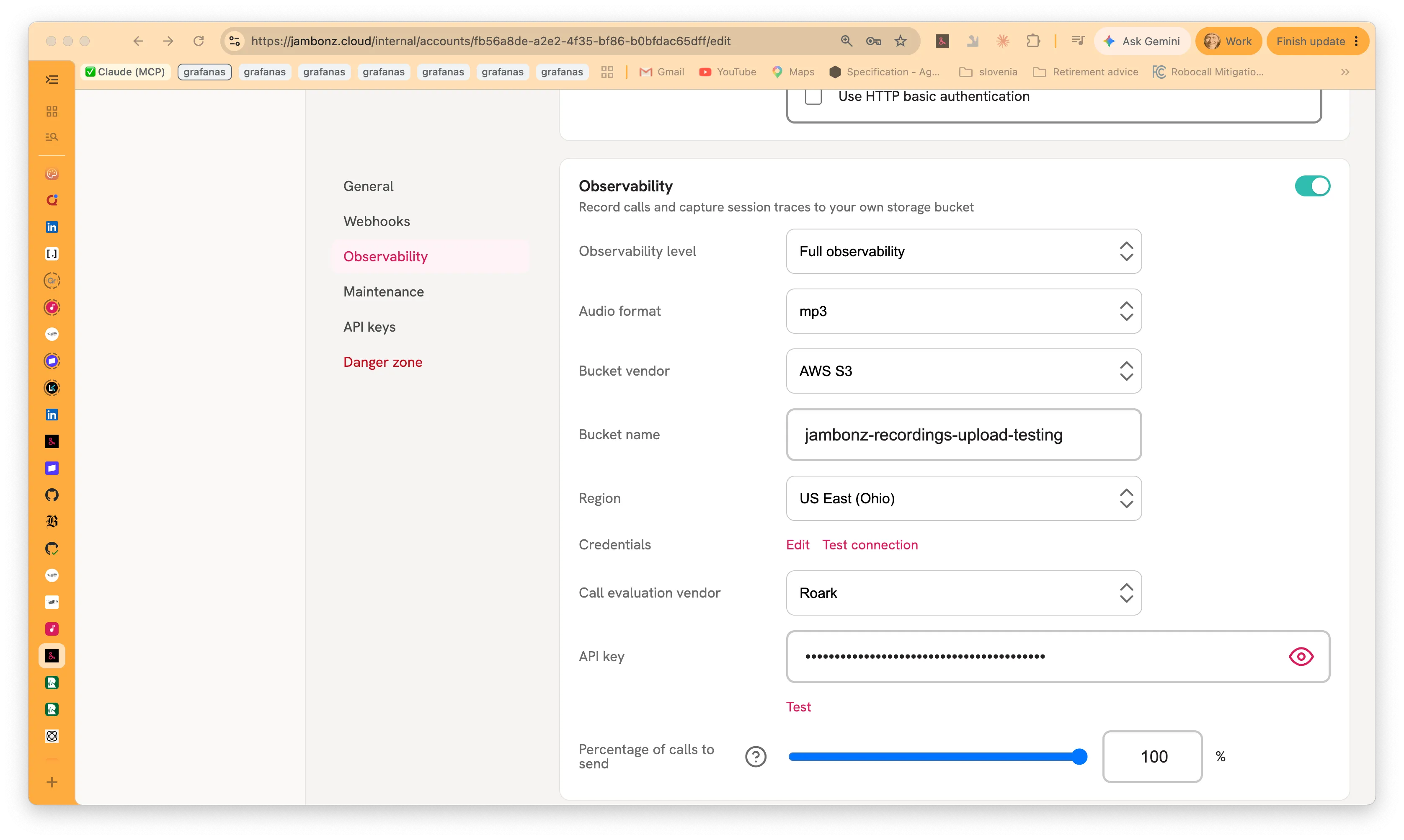
That’s it. From then on, when a call ends and its recording has been safely stored, jambonz hands the vendor a link to the audio along with the details of the call: who called whom, the direction, how it ended, and the jambonz call and account ids. If your observability level is Full, the turn-by-turn transcript goes with it. At Recording only, the audio goes on its own and the vendor transcribes it themselves.
Coval additionally receives a fuller set of metadata: the STT, TTS and LLM vendor and
model that were in play, the turn-detection setting, the termination reason, the
per-stage latencies, barge-in and error counts, and any primitive values from the
tag you set when creating the call. That’s what lets you write conditional metric
rules on the Coval side. Score only the calls that used a particular model, say, or
only the ones that ended badly.
Two things worth knowing about the delivery itself. It happens on the recording server, after the upload finishes, so a slow or unreachable vendor endpoint can never delay a live call. And if a delivery does fail (bad key, vendor outage) you get an entry in the portal’s Alerts view with the HTTP status and response, rather than silence, and calls on jambonz are not affected.
What Coval and Roark Receive from jambonz
Here is what a call looks like once it has landed in Roark. Audio is ready to play, a per-speaker timeline, and Roark’s own metrics filled in:
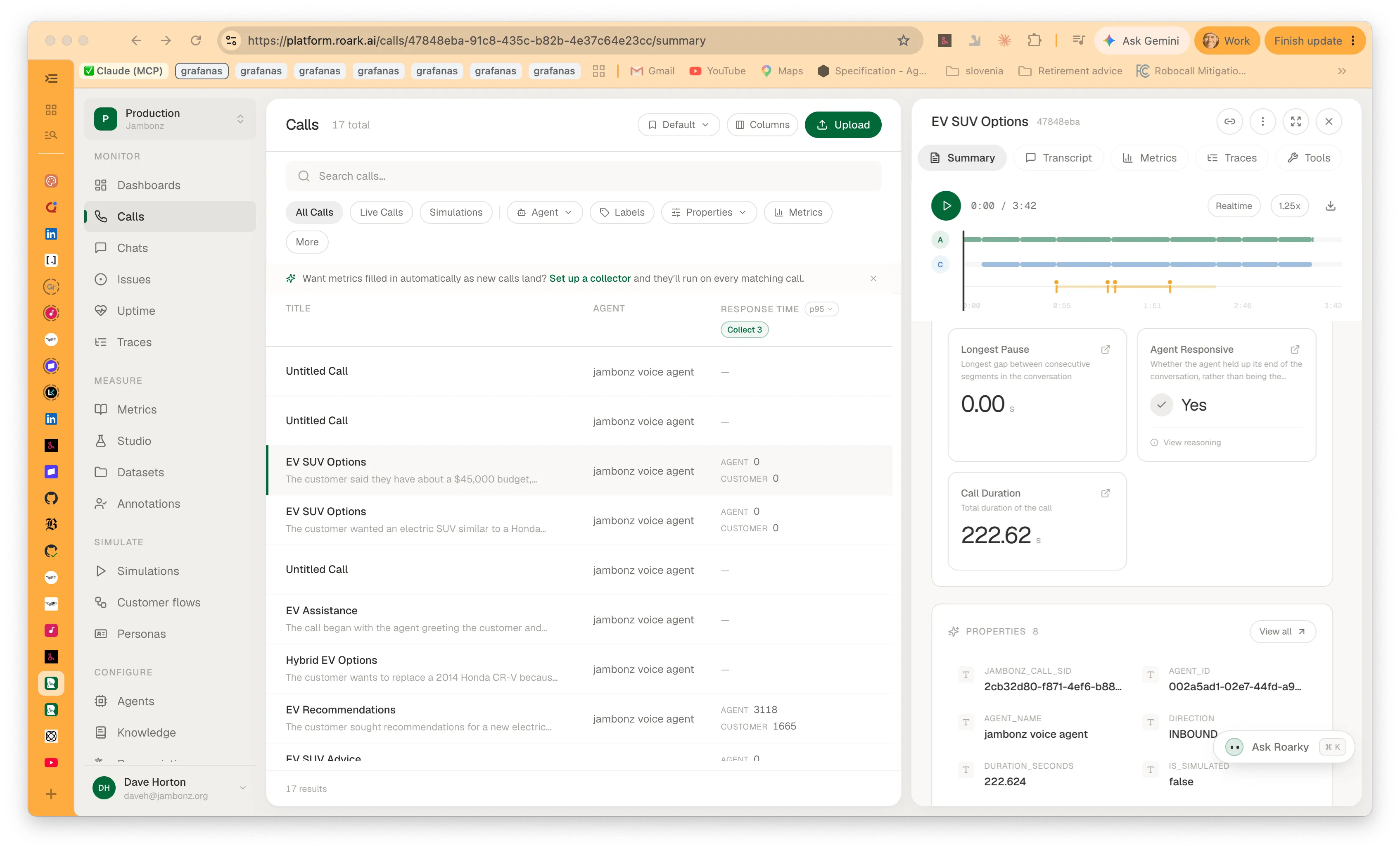
Correlating a call between the two systems is deliberate rather than lucky. The
jambonz_call_sid property you can see on the right of that screenshot is exactly
the call_sid from your jambonz logs, webhooks and recent-calls view, so you can
always get from a call in one system to the same call in the other. jambonz also
sends it as the vendor’s own external identifier, externalId for Roark,
external_conversation_id for Coval, so it works as a search key either way.
One other convenience comes from the same metadata: each call arrives tagged with
your jambonz application_sid as the agent’s id, so Roark groups calls by the
jambonz application that handled them.
Coval presents things its own way. Here is a different call, from the same test agent, with the transcript turn by turn on the right and Coval’s own timing and length metrics computed alongside:
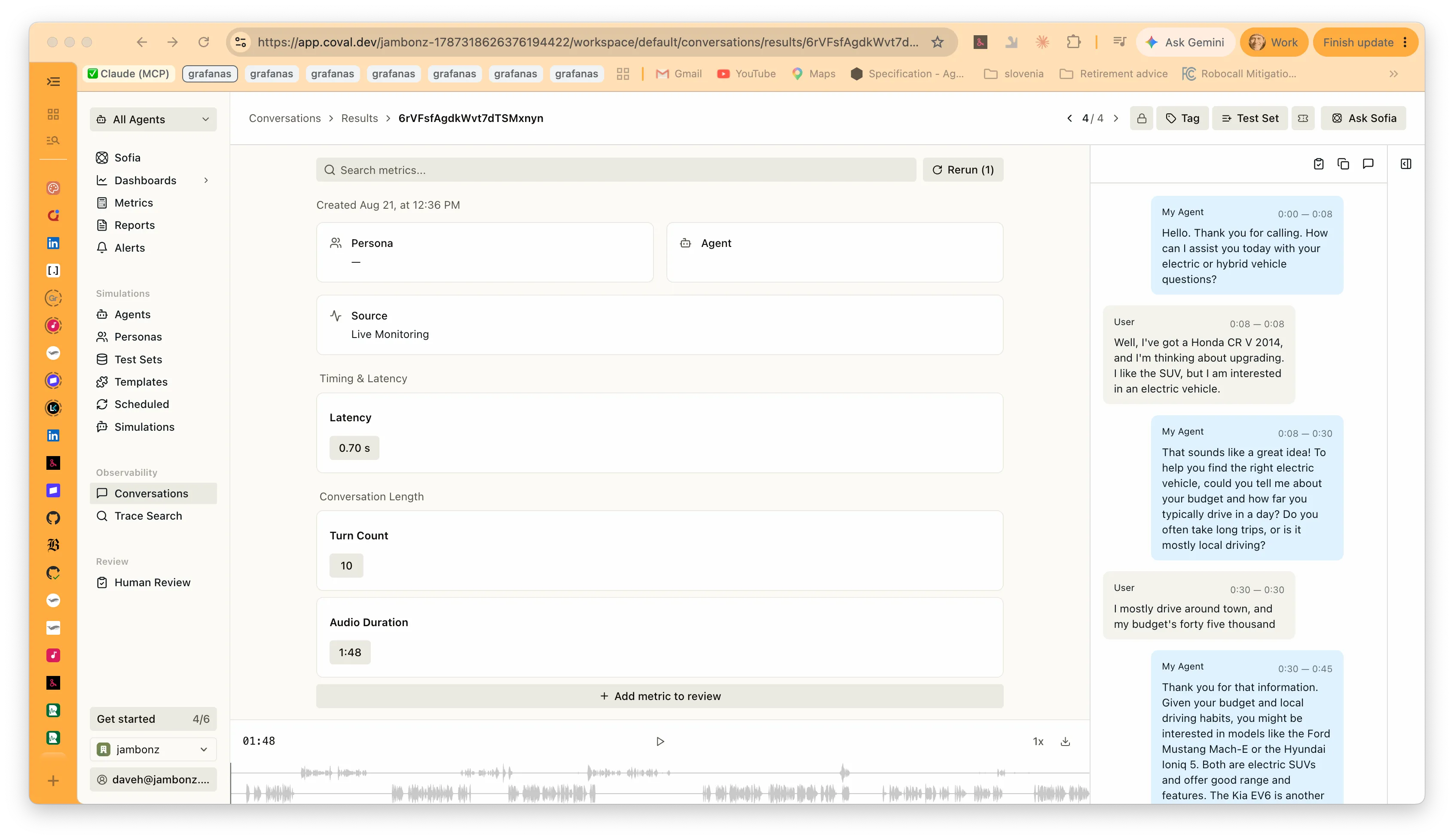
This is the Full observability level doing its work. The transcript came from
jambonz rather than from Coval transcribing the audio, which is why each turn carries
the start and end times it actually had on the call, and why the caller’s turns are
labelled User and the agent’s My Agent. jambonz maps its own per-turn records
into those roles on the way out. Calls that jambonz sends land under Coval’s Live
Monitoring source, which is what keeps them separate from the simulated calls you
run there.
What You Need Before Enabling Call Evaluation
This is the piece that trips people up, so read this part twice.
Evaluation runs on your recordings, which means session observability has to be enabled at either the Recording only or Full observability level. If observability is disabled, there is nothing to send and the portal will not let you configure a vendor.
And your recordings have to live somewhere jambonz can generate a pre-signed URL from, because that is how the vendor fetches the audio. In practice that means:
- AWS S3 or any S3-compatible storage:supported
- Google Cloud Storage:supported
- Azure Blob Storage:not supported today; those calls are skipped
If you are on Azure storage and you want to use this, let us know. It is a matter of demand, not difficulty.
One last note on retention: once a call is delivered, the vendor keeps its own copy under their retention policy. Deleting the recording from your bucket does not delete it from Coval or Roark.
Can I Evaluate Only Some Applications?
There is no separate control for this, and you don’t need one. The eval credential is set at the account level, and the recording server only ever sees calls that were recorded. Each application’s own observability setting overrides the account’s, so set observability to disabled on any application you don’t want evaluated, and those calls produce no recording and no eval. The tradeoff to be aware of is that this excludes them from recording too; “record it but don’t evaluate it” isn’t something you can express today.
What’s Coming Next for jambonz Evaluations?
What ships in 11.1.4 is deliberately the simple version: recorded calls go to the evaluation platform of your choice, and everything else happens over there. But there is clearly more that jambonz and these platforms could do together, and we would rather build what you actually want than guess. A few of the directions we have already thought about:
- Per-application control over what gets evaluated, so you can record everything for compliance and evaluate only the applications you care about.
- Support for Azure Blob storage, so the storage backend stops deciding whether you can use this at all.
- Evaluation results coming back the other way, so a score lives next to the call in jambonz rather than only in the vendor’s dashboard.
If one of those is the thing you need, say so and it moves up the list. If the thing you need isn’t on it at all, we especially want to hear that.
Resources
Available now in jambonz 11.1.4. As always, come tell us how it goes (and what you want next) in the jambonz community.